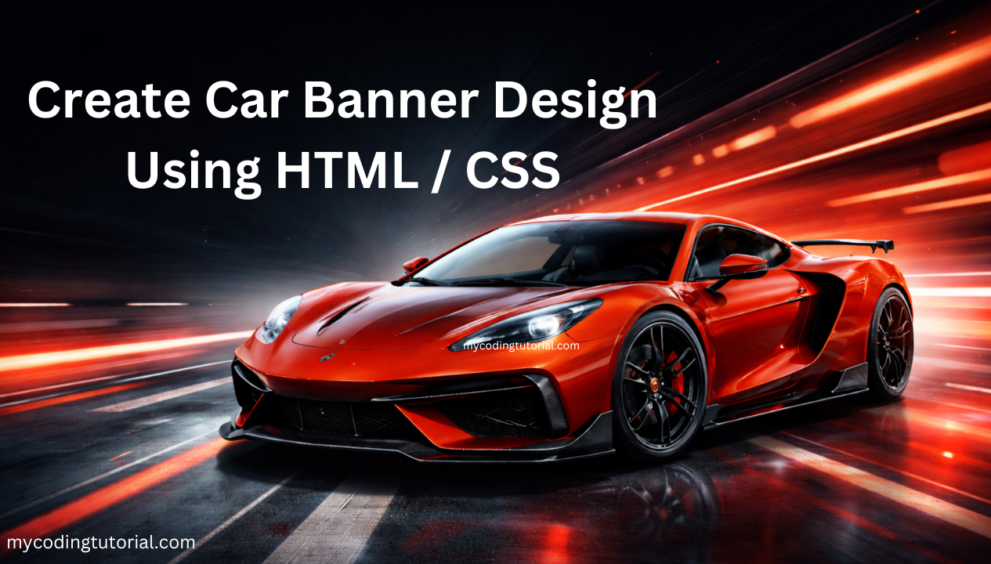


A car banner design is a powerful visual element that helps capture user attention instantly. Whether you’re building a car dealership website or an automotive landing page, a modern banner design can improve engagement and conversions.
Using HTML and CSS, you can create a clean, responsive, and visually appealing car banner without any heavy frameworks.
index.html
<!DOCTYPE html>
<html lang="en">
<head>
<meta charset="UTF-8">
<meta name="viewport" content="width=device-width, initial-scale=1.0">
<title>Car Banner Design Code By Mycodingtutorial</title>
<link rel="stylesheet" href="style.css">
<!-- Google Font -->
<link href="https://fonts.googleapis.com/css2?family=Inter:wght@300;400;600;700&display=swap" rel="stylesheet">

<!-- Font Awesome -->
<link rel="stylesheet" href="https://cdnjs.cloudflare.com/ajax/libs/font-awesome/6.5.0/css/all.min.css">

</head>

<body>

<!-- HEADER -->
<header class="header">
  <div class="container">

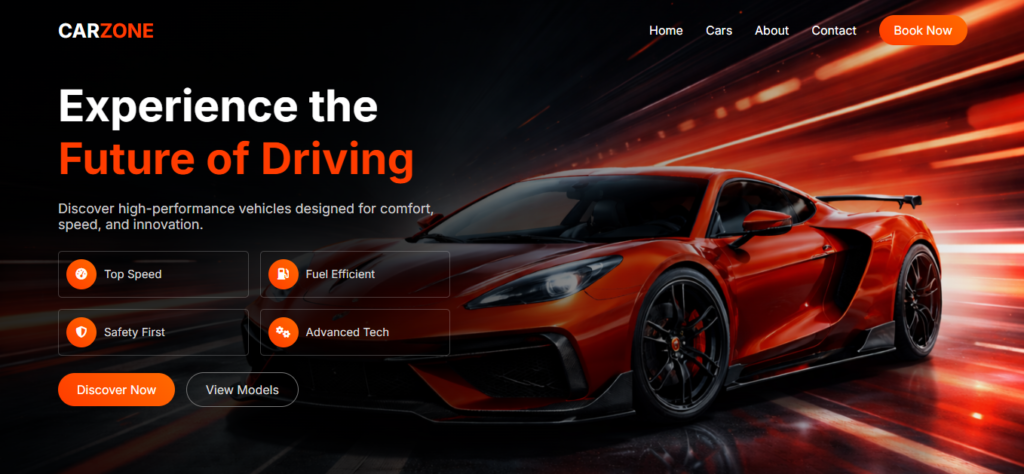
    <div class="logo">CAR<span>ZONE</span></div>

    <nav class="nav" id="navMenu">
      <a class="menu" href="#">Home</a>
      <a class="menu" href="#">Cars</a>
      <a class="menu" href="#">About</a>
      <a class="menu" href="#">Contact</a>
      <a href="#" class="btn-header">Book Now</a>
    </nav>

    <div class="menu-toggle" id="menuToggle">
      <i class="fas fa-bars"></i>
    </div>

  </div>
</header>

<!-- HERO -->
<section class="hero">
  <div class="hero-overlay"></div>

  <div class="hero-content">

    <h1>
      Experience the <br>
      <span>Future of Driving</span>
    </h1>

    <p>
      Discover high-performance vehicles designed for comfort, speed, and innovation.
    </p>

    <div class="features">
      <div class="feature"><i class="fas fa-tachometer-alt"></i> Top Speed</div>
      <div class="feature"><i class="fas fa-gas-pump"></i> Fuel Efficient</div>
      <div class="feature"><i class="fas fa-shield-alt"></i> Safety First</div>
      <div class="feature"><i class="fas fa-cogs"></i> Advanced Tech</div>
    </div>

    <div class="buttons">
      <a href="#" class="btn-primary">Discover Now</a>
      <a href="#" class="btn-secondary">View Models</a>
    </div>

  </div>
</section>

<!-- OVERLAY -->
<div class="menu-overlay" id="menuOverlay"></div>

<!-- SCRIPT -->
<script>
const menuToggle = document.getElementById("menuToggle");
const navMenu = document.getElementById("navMenu");
const overlay = document.getElementById("menuOverlay");

menuToggle.addEventListener("click", () => {
  navMenu.classList.toggle("active");
  overlay.classList.toggle("active");
  menuToggle.classList.toggle("active");

  if (navMenu.classList.contains("active")) {
    menuToggle.innerHTML = '<i class="fas fa-times"></i>';
  } else {
    menuToggle.innerHTML = '<i class="fas fa-bars"></i>';
  }
});

overlay.addEventListener("click", () => {
  navMenu.classList.remove("active");
  overlay.classList.remove("active");
  menuToggle.classList.remove("active");
  menuToggle.innerHTML = '<i class="fas fa-bars"></i>';
});

document.querySelectorAll(".nav a").forEach(link => {
  link.addEventListener("click", () => {
    navMenu.classList.remove("active");
    overlay.classList.remove("active");
    menuToggle.classList.remove("active");
    menuToggle.innerHTML = '<i class="fas fa-bars"></i>';
  });
});
</script>

</body>
</html>
You will also like this post
styles.css
* {
  margin: 0;
  padding: 0;
  box-sizing: border-box;
  font-family: "Inter", sans-serif;
}

/* HEADER */
.header {
  position: absolute;
  width: 100%;
  top: 0;
  left: 0;
  z-index: 999;
  padding: 20px 80px;
}

.container {
  display: flex;
  justify-content: space-between;
  align-items: center;
}

.logo {
  font-size: 26px;
  font-weight: 700;
  color: #fff;
}

.logo span {
  color: #ff3c00;
}

/* NAV */
.nav {
  display: flex;
  align-items: center;
  gap: 30px;
  transition: 0.4s ease;
}

.nav a.menu,
.nav a.btn-header {
  position: relative;
  color: #fff;
  text-decoration: none;
  font-size: 16px;
}

/* NAV HOVER */
.nav a.menu::after {
  content: "";
  position: absolute;
  left: 0;
  bottom: -5px;
  width: 0%;
  height: 2px;
  background: #ff3c00;
  transition: 0.3s;
}

.nav a.menu:hover::after {
  width: 100%;
}

.btn-header {
  background: linear-gradient(45deg, #ff3c00, #ff6a00);
  padding: 10px 20px;
  border-radius: 25px;
}

/* MENU TOGGLE */
.menu-toggle {
  display: none;
  font-size: 30px;
  color: #fff;
  cursor: pointer;
  z-index: 1001;
}

.menu-toggle i {
  transition: 0.3s;
}

.menu-toggle.active i {
  transform: rotate(180deg);
}

/* HERO */
.hero {
  height: 100vh;
  display: flex;
  align-items: center;
  padding: 0 80px;
  position: relative;
  background: url("23.png") no-repeat center right/cover;
  background-attachment: fixed;
}

/* OVERLAY */
.hero-overlay {
  position: absolute;
  inset: 0;
  background: linear-gradient(
    to right,
    rgba(0,0,0,0.85) 35%,
    rgba(0,0,0,0.4) 60%,
    rgba(0,0,0,0) 100%
  );
}

.hero-content {
  position: relative;
  z-index: 2;
  max-width: 520px;
  color: #fff;
}

.hero h1 {
  font-size: 58px;
  line-height: 1.2;
}

.hero h1 span {
  color: #ff3c00;
}

.hero p {
  margin: 20px 0;
  color: #ccc;
  font-size: 18px;
}

/* FEATURES */
.features {
  display: grid;
   grid-template-columns: repeat(2, 1fr);
  gap: 15px;
  margin: 25px 0 35px 0px;
}

.feature {
    display: flex;
    align-items: center;
    gap: 10px;
    color: #ddd;
    border: 1px solid #d3d3d342;
    font-size: 15px;
    transition: 0.3s;
    padding: 10px 10px 10px 10px;
    border-radius: 5px;
}

.feature i {
    width: 40px;
    height: 40px;
    border-radius: 50%;
    display: flex;
    align-items: center;
    justify-content: center;
    background-image: linear-gradient(45deg, #ff3c00, #ff6a00);
    color: #ffffff;
    transition: 0.4s ease;
}

.feature:hover {
  transform: translateX(5px);
}

/* BUTTONS */
.buttons {
  margin-top: 25px;
}

.btn-primary,
.btn-secondary {
  position: relative;
  overflow: hidden;
  z-index: 1;
  padding: 12px 25px;
  border-radius: 30px;
  text-decoration: none;
  margin-right: 10px;
}

.btn-primary {
  background: linear-gradient(45deg, #ff3c00, #ff6a00);
  color: #fff;
}

.btn-secondary {
  border: 1px solid #777;
  color: #ddd;
}

/* BUTTON HOVER EFFECT */
.btn-primary::before,
.btn-secondary::before {
  content: "";
  position: absolute;
  inset: 0;
  background: #fff;
  transform: scaleX(0);
  transform-origin: left;
  transition: 0.4s ease;
  z-index: -1;
}

/* MENU OVERLAY */
.menu-overlay {
  position: fixed;
  inset: 0;
  background: rgba(0,0,0,0.6);
  backdrop-filter: blur(4px);
  opacity: 0;
  visibility: hidden;
  transition: 0.3s;
  z-index: 998;
}

.menu-overlay.active {
  opacity: 1;
  visibility: visible;
}

/* MOBILE */
@media (max-width: 992px) {

  .header {
    padding: 20px;
  }

  .hero {
    padding: 0 20px;
    background-position: center;
    background-attachment: scroll;
  }

  .hero h1 {
    font-size: 40px;
  }

  .features {
    grid-template-columns: 1fr;
  }

  .nav {
    position: fixed;
    top: 0;
    right: -100%;
    height: 100vh;
    width: 260px;
    background: #111;
    flex-direction: column;
    align-items: flex-start;
    padding: 80px 20px;
    gap: 20px;
    transition: 0.4s ease;
    opacity: 0;
  }

  .nav.active {
    right: 0;
    opacity: 1;
  }

  .menu-toggle {
    display: block;
  }
}
/* FORCE 2 COLUMN ON TABLET */
@media (max-width: 992px) {
  .features {
    grid-template-columns: repeat(2, 1fr);
  }
}

/* FORCE 2 COLUMN ON MOBILE */
@media (max-width: 576px) {
  .features {
    grid-template-columns: repeat(2, 1fr);
    gap: 10px; /* optional tighter spacing */
  }
}
Conclusion
Creating a car banner design using HTML CSS is simple and effective. With responsive layout, clean UI, and engaging elements, you can build a professional automotive website that attracts users and boosts conversions.